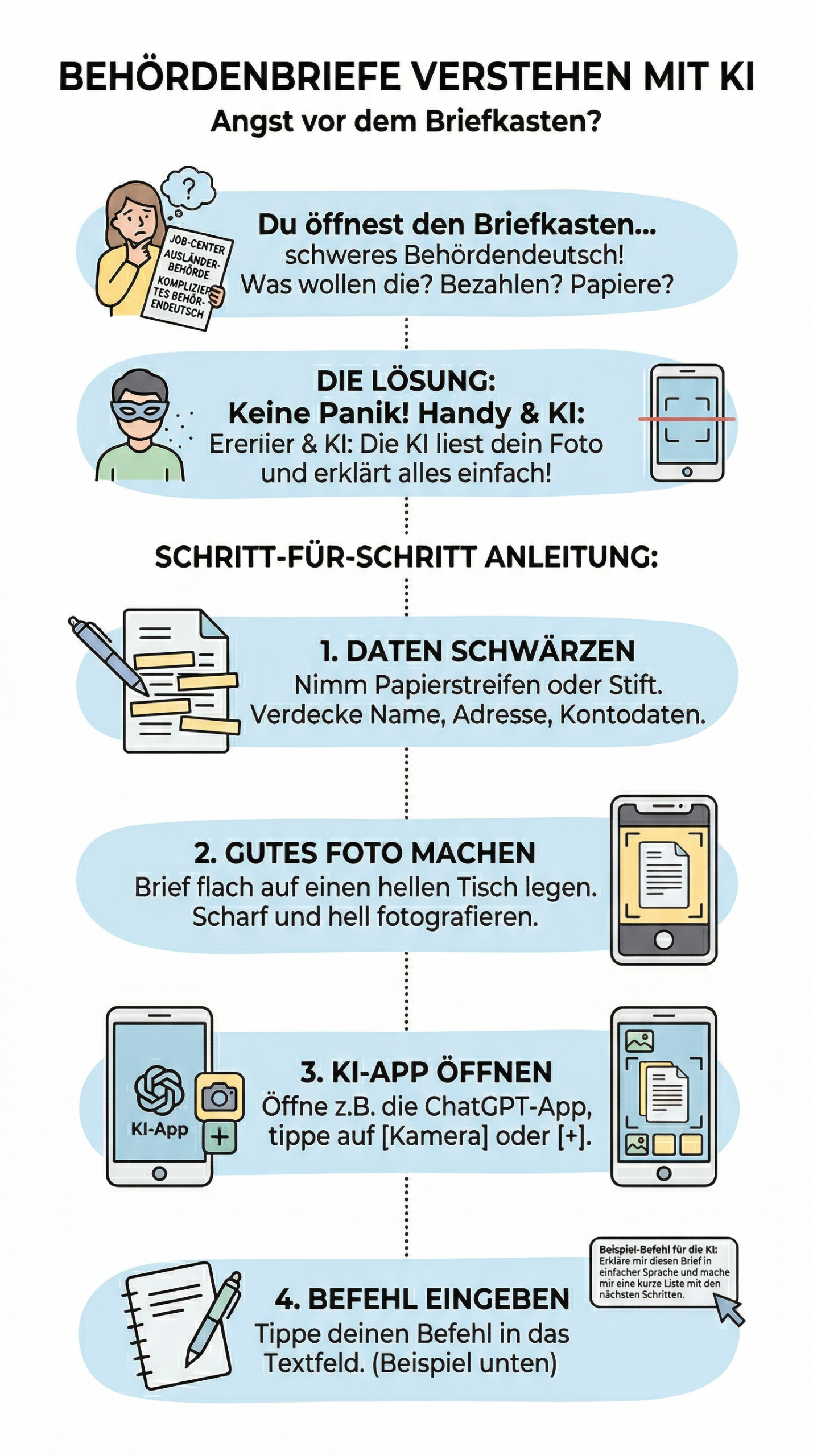
Introduction: Fear of the mailbox?
Imagine this: You open your mailbox and find a long letter from an authority (for example, the job center or the immigration office). The text is full of difficult German words and long sentences.
"What do they want from me? Do I have to pay something? Are papers missing? I just don't understand this complicated bureaucrat-speak!"
Don't panic, this happens to many Germans! With your phone and artificial intelligence, you can easily translate and have the letter explained to you in just a few seconds.
The solution: The AI reads your photo
Modern AI apps have a photo function. You simply take a picture of your letter. The AI can read the printed text. It translates the "bureaucratic German" into simple language and provides you with a short list: What happened and what do you need to do now?
Step-by-step guide
- Redact data This is extremely important! Take small paper strips or a black marker. Cover your name, address, customer numbers, and bank details on the paper.
- Take a good photo: Lay the letter flat on a bright table. Make sure the photo is not blurry. Photograph the second page as well, if there is one.
- Open AI App For example, open the ChatGPT app on your phone and tap the small 📷 camera icon or the plus sign (+).
- Upload photo: Choose the photo of your letter.
- Enter command: Write the text from the box below and click "Submit".
💻 Your Copy Prompt (The Command)
Insert photo and copy this text to it:
Here is a photo of an official letter from the [Name of Authority, e.g., Jobcenter].
Please read the letter and respond in very simple language.

Summarize and structure your answer as follows:
1. Summary: What is it about in 2 short sentences?
2. To-Dos: What exactly do I need to do now?
3. Deadlines: By which date do I need to respond? (Please mark in red or bold)
4. Documents: Which documents do I need to send?
What do the brackets [ ] mean?
Replace the text in the parentheses with the sender of the letter. For example: Foreigners' Registration Office, Family Benefits Office, Tax office or Health insurance.
This is what the AI's answer looks like (example):
Summary: The Jobcenter needs further information about your rent. Your application cannot be fully processed yet.
2. To-Dos: You need to make a copy of your new rental agreement and submit it by mail or online.
3. Deadlines: You have to do it by October 15 Get it done!
4. Documents: Only the current rental agreement (all pages).
Checklist: What you need to consider
- ✅ Data Privacy First: Never upload photos with your bank details (IBAN), your ID card number, or illnesses! Always cross it out on the paper before you take a photo.
- ✅ Self-monitoring deadlines: The AI can sometimes make mistakes. Always check the date at the top of the letter yourself and verify the deadline (e.g., "within 4 weeks").
- ✅ No legal advice: The AI is not a real lawyer. If the letter comes from a court or is an eviction notice, always take the letter to a real advice center or to volunteers!
- ✅ Photo quality: Is the photo dark or shaky? The AI might read the wrong words then. Always take the photo by the window in daylight.
🛠 Toolbox: These apps help you
Download one of these apps to your phone for free to upload photos:
ChatGPT App
The official app. The camera icon is right next to the text field. Works very quickly and reads text from photos excellently.
Microsoft Copilot App
A great alternative, as it completely uses the powerful "GPT-4" language model for images for free. Very good with heavy documents.
Gemini App / Google Lens
Already pre-installed on many Android phones. You take a photo and immediately ask Google AI what's in the letter.
Your Advantage ✉️
You immediately understand what's important and never miss a deadline again. Here's how to lose your fear of the mailbox!
Was this helpful?
0 / 0
 English
  German
  Arabic
  Ukrainian
  Persian
  Kurdish